Pingz – Network Testing Tool
A simple, user-friendly networking connectivity checker and logger for Windows
Ever needed to diagnose a network connectivity problem for a user, needing to identify when they lose network connectivity locally?
Of course you could use the ping command from the CLI, but it lacks a user friendly UI. Pingz gives you this. You just need something simple. No external websites or services. Quick & easy for end users.
This is for you …and all for the price of a visit to your local coffee shop!
Pingz – Network Connectivity Tester
With logging
inc. VAT – Per User
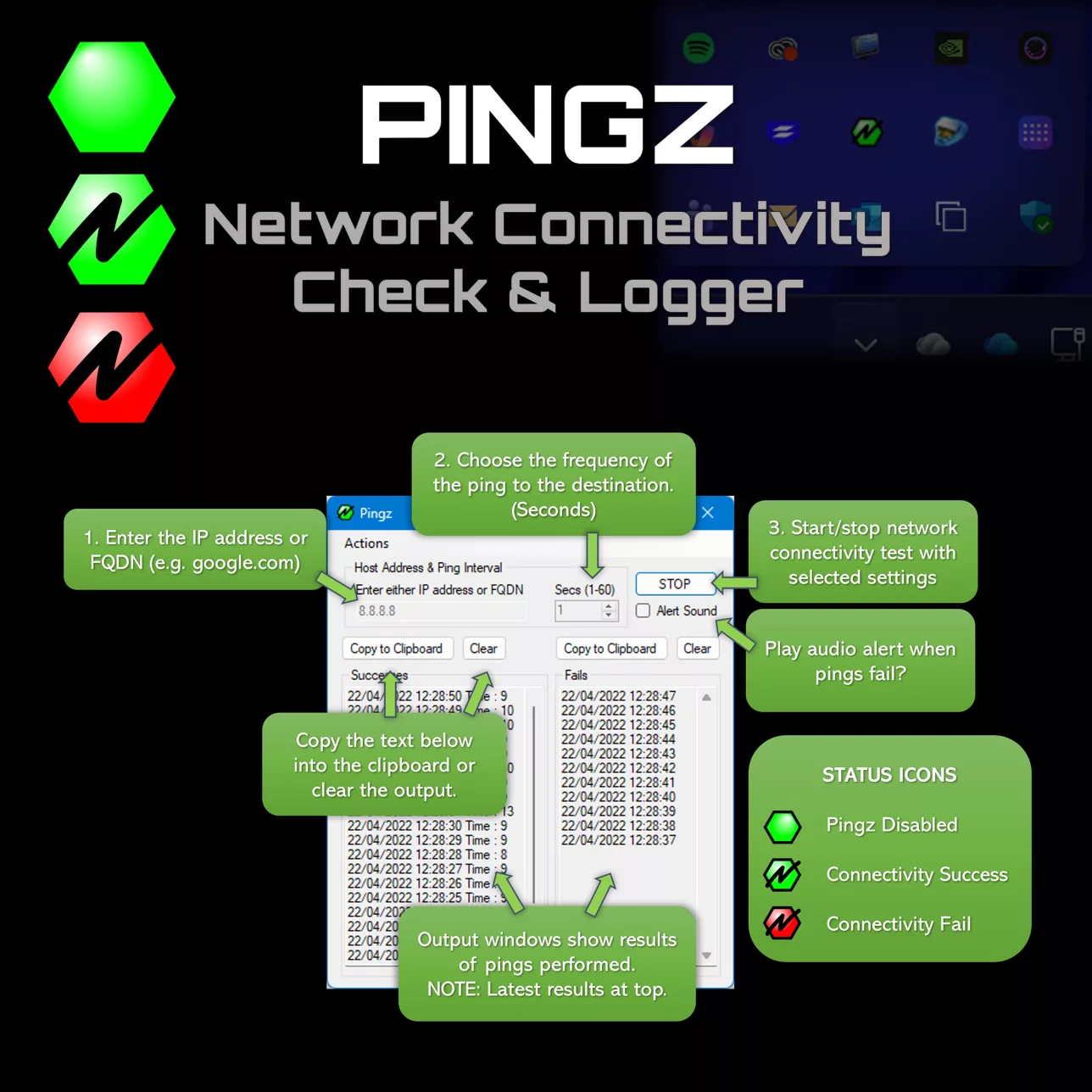
Simple, Effective
User Friendly Interface
No command line required. Simple, intuitive UI that anyone can use without technical expertise.
Built in logging
Logs success and failures , giving you a complete history of network connectivity.
System Tray Integration
Minimizes with system tray status icons to keep users informed without cluttering the desktop.
CustomiSable
Choose what to ping and set your preferred frequency. Configure it exactly how you need it.
Multiple instances
Run as many instances as you need to monitor multiple hosts or connections simultaneously.
Lightweight
Less than 1MB in size. Quick to download and run. Portable app. No need to ‘install’
See Pingz in action
The small simple tool you have always wanted
Just for the price of a visit to your local coffee shop!